Your site speed isn't a technical metric anymore. It's a business one.
In 2026, three things care about how fast your site loads: Google, the AI engines that are starting to replace Google, and your visitors. All three are making the same decision about slow sites — and most WordPress owners don't realize their site is in the rejection pile until the traffic stops coming.
Google's own research says it plainly: 53% of mobile visitors abandon a page that takes longer than three seconds to load. The average WordPress site, on shared hosting, running a themed page builder with 20+ plugins, loads in 4 to 8 seconds on mobile. Do the math. More than half your traffic is gone before they see your hero headline.
And that's just the visitor problem. The bigger problem in 2026 is AI search.
Why AI search engines are quietly punishing WordPress sites
ChatGPT, Gemini, Perplexity, and Claude don't "rank" sites the way Google does. They cite them. When someone asks "What's the best real estate agent in Kailua-Kona?" or "How do I pick a CPA in Denver?", these models return a short list of sources. Getting on that list is the new SEO — what the industry is starting to call AEO (Answer Engine Optimization) or GEO (Generative Engine Optimization).
Here's what most people miss: AI crawlers have tight time budgets. They're not patient. If your site takes 6 seconds to render because WordPress is spinning up PHP, querying the database, rebuilding the page, and loading 40 cached plugins, the crawler may give up, misread your structure, or simply move to a competitor's faster site that renders cleanly. You don't show up in the citation.
Worse — most AI engines only parse the HTML that arrives in the initial response. If your WordPress theme loads content through JavaScript widgets or lazy-hydrated blocks, the AI never sees it. Your best content becomes invisible to the systems that will route the next decade of search traffic.
What Google's Lighthouse score is actually measuring
Google's Lighthouse is the single most important number in your site's technical report card. It scores four buckets from 0 to 100:
Performance — how fast the page loads and becomes interactive
Accessibility — can screen readers, keyboard users, and motion-sensitive visitors use your site
Best Practices — secure connections, no deprecated code, proper image formats
SEO — meta tags, structured data, crawlability
A score below 50 on Performance tells Google you're offering a poor experience. Sites in that band get de-ranked in mobile search. A score below 33 is the kind of page Google actively flags in Search Console as "Poor." And a vanilla WordPress site with a page-builder theme — Divi, Elementor, Beaver Builder, Avada, most Agent Image and luxury real estate templates — almost always scores in the 20s or 30s on mobile without heavy optimization.
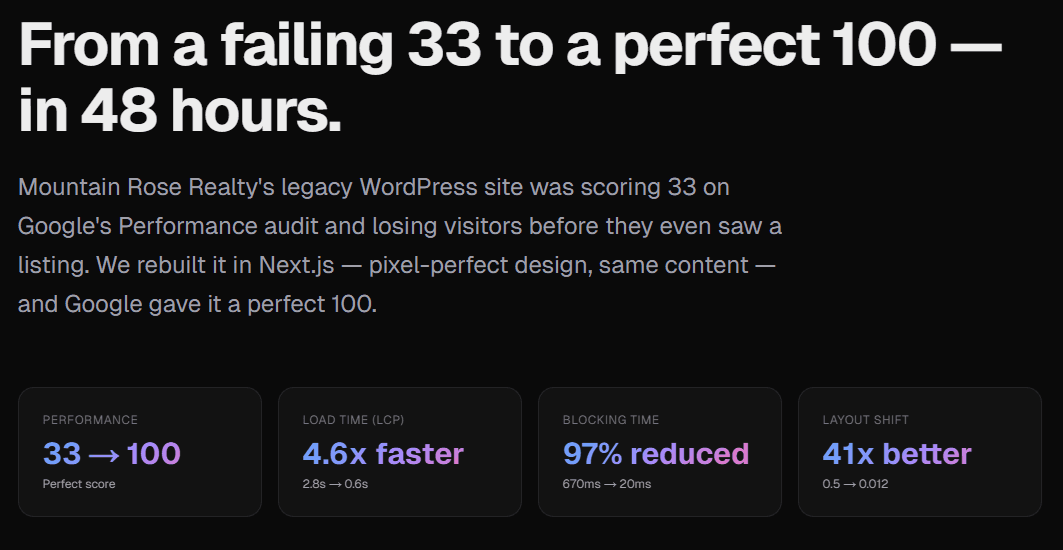
I saw a real-world case recently where a luxury real estate site's WordPress install was scoring 33 on Google's Performance audit. Same content, same design, same listings — they weren't doing anything wrong editorially. The architecture underneath was just broken for 2026.
After rebuilding that site in Next.js — pixel-perfect design, identical content — Google scored it a 100. Forty-eight hours, from 33 to 100. Screenshots of the audit results are public if you want to see what a perfect score looks like on a real estate site built this way.
Why Next.js beats WordPress on every axis that matters in 2026
Think of the difference like this. WordPress is a restaurant that cooks your meal fresh every time someone walks in. Database query, PHP render, template compile, plugin execution — each visitor triggers the whole kitchen. That's fine at 10 visitors a day. It falls apart at 1,000.
Next.js is a restaurant that prepares every meal at 3 a.m. and hands them out pre-plated. The page is already built, already compressed, already served from a CDN edge node 20 miles from your visitor. No database. No PHP. No plugin chain. The visitor gets a fully-rendered HTML document in under a second.
Concretely, here's what changes:
Pages load 3 to 5 times faster. Static generation + global CDN means sub-second first paint even on 4G mobile. That's the gap between keeping a visitor and losing them.
Google rewards the speed. Core Web Vitals (LCP, INP, CLS) all improve dramatically. Sites that were ranking on page 2 often move to page 1 within weeks — not because the content changed, but because Google's algorithm now sees a fast, accessible page where it used to see a slow one.
AI engines cite you more. Clean server-rendered HTML with proper semantic structure (h1, h2, schema.org JSON-LD) is exactly what LLMs parse best. I've watched clients go from zero AI citations to being recommended by ChatGPT and Perplexity for their target queries within a quarter of migrating.
Your hosting bill drops to roughly zero. Vercel's free tier handles most small-to-mid-sized real estate, law firm, and consulting sites. Cloudflare Pages and Netlify work the same way. Goodbye to $30–$100 per month for WordPress hosting that still crawls during traffic spikes.
You stop updating plugins every Monday. Static sites have no plugins to patch, no admin login to brute-force, no database to get SQL-injected. The attack surface shrinks to almost nothing.
The AEO / GEO angle most site owners aren't thinking about yet
Here's the uncomfortable truth about the next three years: a growing share of your would-be visitors will never see your Google results page. They'll ask an AI assistant directly. The assistant will answer. Your site either gets cited as a source or it doesn't.
What makes a site citable by AI?
Fast, server-rendered HTML. The AI needs your content in the first response, not after a JavaScript framework hydrates.
Clean semantic markup. Proper headings, lists, tables, FAQ schemas.
Structured data. Schema.org JSON-LD that tells the AI what entity the page represents (a RealEstateAgent, a LocalBusiness, a Product, a FAQPage).
Topical depth. Not thin pages — full content clusters the AI can use to understand your authority in a niche.
Fresh content. AI models discount stale pages faster than Google does.
A clean Next.js build nails the first four out of the box. The fifth is up to you.
A WordPress site can technically hit these marks, but it takes aggressive caching plugins, custom theme work, and constant vigilance to stay fast. Most small-business owners can't afford the developer time to maintain that, and the shortcuts (WP Rocket, Cloudflare Pro, over-aggressive plugins) often break accessibility and SEO while "fixing" speed.
What the migration actually looks like
This is where most site owners freeze up. "Rebuilding my site" sounds like a three-month project with a five-figure budget. In 2026, it doesn't have to be.
The modern approach uses AI to clone your existing WordPress site pixel-perfect into a Next.js codebase. Same design, same content, same listings, same fonts, same photos. What changes is the engine underneath: static HTML served from a global CDN instead of PHP rendered on every request.
A few options depending on budget and technical comfort:
Do it yourself if you're comfortable in code. Start a Next.js project, use Tailwind for styling, deploy to Vercel. Plan 40–80 hours to clone a typical marketing site.
Hire a developer for $5,000–$25,000 depending on site size and complexity. Timeline: 4–12 weeks.
Use an AI-powered clone service. New tools like CloneMySite scan your existing WordPress URL, auto-clone it pixel-perfect to Next.js, and ship the result in 48 hours — you get the source code deployed to your own Vercel account with no vendor lock-in. This is a good fit for owners who want the benefits without the project management overhead.
Whichever path you pick, the architectural outcome is the same: a site that loads in under a second, scores 90+ on Lighthouse, renders cleanly for AI crawlers, and costs nothing to host.
What to do this week
You don't have to commit to a full migration to get started. Three things you can do in the next seven days:
Run your homepage through PageSpeed Insights. Note your mobile Performance score and your LCP (Largest Contentful Paint) time. If you're below 50 on mobile or over 3 seconds on LCP, you have a speed problem — not a minor one.
Run the same test on your top three competitors. If they're at 70+ and you're at 30, you're already losing search rankings you should be winning.
Ask ChatGPT, Gemini, and Perplexity the top five queries your ideal customer would ask to find someone like you. Check whether you're cited. If you're not, speed is almost certainly part of the reason.
The web is moving on from WordPress the same way it moved on from Flash and on-site CGI scripts. The sites that migrate to modern architectures will own the search traffic — both traditional and AI — for the next decade. The ones that don't will quietly lose ground every month, and they won't fully understand why until it's too late to catch up.
Your site speed isn't a technical concern. It's the gate between you and everyone who was about to become a customer.
Want to check where you stand?
Run your homepage through PageSpeed Insights and share your score in the comments
If you're curious what a 48-hour migration from WordPress to Next.js looks like in practice, the Mountain Rose Realty case study walks through the before/after scores, stack decisions, and cost to host. Worth a read even if you end up going a different direction.